Introduction
We are happy to announce the simultaneous release of Dasharo firmware v1.1.8 for MSI PRO Z690-A and v0.9.6 for MSI PRO Z790-P. The full changelogs are available in the Dasharo documentation:
The previous releases (v1.1.7 and v0.9.5) introduced a lot of new features, like preliminary SMI Transfer Monitor support and the new Platform Setup Menu with experimental overclocking options. Unfortunately, they also turned out to be unstable on certain configurations, with operating systems failing to boot or disks not being detected. Due to these critical issues, v1.1.7 and v0.9.5 are superseded by v1.1.8 and v0.9.6 and we recommend all users to update as soon as possible. The v1.1.7 and v0.9.5 versions will be withdrawn from the download system.
This release is not only about fixes though. We have made significant progress with DDR4 XMP training and CPU tuning, which we also presented during the recent Dasharo Intel FSP integration call:
Let’s walk through what’s new.
Fixed
OS Failing to Boot with iGPU and dGPU / Firmware Unable to Detect Disks
The most severe issues of the previous release were operating systems failing to boot when both integrated and discrete GPUs were enabled, and the firmware not being able to detect disks. Both issues were related and caused by problems with the memory map and resource allocation. These are now resolved.
CPU Turbo Boost Not Functional
Some of the new options exposed in the Platform Setup Menu silently changed other default options in Intel FSP. As a result, the CPU had basically no room to boost for longer than a fraction of a second - the cores were simply undersupplied with power. Turbo Boost works as expected again.
Related to this, new settings in the Platform Setup Menu are now reset to the platform-default values instead of zero, and those default values will be shown on the first boot after the update.
Incorrect DIMM SPD Size Causing DDR5 XMP Training Failure
On the DDR5 board variant, an incorrect DIMM SPD size caused an incomplete read of the SPD data, which was then passed to FSP. Any attempt to train the memory with an XMP profile simply failed. The full SPD is now read and passed to the memory training code.
Firmware UI Not Stretched to Full Screen Resolution
The firmware user interface was no longer stretched to the full screen. This was caused by leaving the serial console redirection enabled by default, while previously it was disabled. When serial redirection is active, the number of rows and columns has to match on both the graphical and serial console, so that the output can be mirrored on both. If you see a small UI, disabling the serial console redirection in the firmware setup restores the full screen resolution.
DDR4 XMP Training Success Story
With this release, DDR4 XMP profiles can be trained quite reliably. This has already been confirmed on more than one setup. One of our community members received a pre-release version of the firmware and was able to replicate the results comparable to the MSI stock firmware using the same memory and CPU settings. That is a great success!
How did we get there? The first step was to raise the DRAM voltage, so that the higher frequencies defined in XMP profiles can work reliably. However, as discussed on the Intel FSP repository, FSP has no knowledge of the DDR4 voltage regulation, as it is specific to the motherboard design. FSP provides extra hooks to set the memory voltage at the proper point of the memory training process, but these hooks are only available in FSP dispatch mode, used by UEFI reference implementations. coreboot uses FSP API mode, so these hooks are out of reach. Fortunately, setting the DRAM voltage expected by the given XMP profile before jumping to FSP works just fine, and FSP does not seem to have a problem with that approach.
That was not enough to make the training reliable though. To reach a nearly
100% success rate with DDR4 modules, we had to tell FSP to skip a certain
subset of error paths via the ExitOnFailure parameter. Then we confirmed the
memory stability with memory tests, which passed without any errors.
Interestingly, when FSP is told not to ignore those errors, it refuses to
train the memory with XMP profile, even though the resulting configuration is
stable.
What About DDR5 XMP?
Besides the SPD size fix mentioned above, there is unfortunately not much progress with DDR5 XMP. On DDR5 the voltage is controlled by the PMIC on the module itself, so FSP can set the voltage required by a given XMP profile, but as many users have already noticed, this is not enough to train the memory. Moreover, many XMP profiles are designed for one DIMM per channel, so with all four slots populated, failure is even more likely.
According to Intel, board vendors tend to modify FSP or its memory training algorithms to make their boards perform better than with the reference FSP binary. Extracting the FSP from vendor firmware is not really an option, as we do not know the headers (UPD layout) used with such modified FSP. Getting DDR5 XMP to work reliably would likely require much more expertise and exposing a lot of additional tuning options, which translates to weeks, if not months, of work.
Overclocking Options: The Good, the Bad and the Undocumented
Warning: These options are experimental. Incorrect settings may cause system instability or hardware damage. Use them at your own risk.
Following many community requests, the Platform Setup Menu now allows modifying the voltage/frequency curves, disabling the undervolt protection and current excursion protection, adjusting turbo ratio multipliers, load line, and power limits. You can now fine-tune the performance of your machine to your needs, whether you want more performance or lower power consumption.
Probably the most impactful option is the load line configuration. By lowering the load line a little, the CPU gets access to much more performance with otherwise default settings. Lower load line means lower voltage, and lower voltage means lower current, leaving more room within the platform power limits. MSI stock firmware also ships slightly lower load line values than Intel recommended defaults, which is one of the reasons it achieves better overall performance. Or is it really? The Intel’s documentation for the processors gives the default load line values for each processor SKU, and this is what coreboot uses. However, when passing 0 as the load line to FSP (which is equivalent to no-override, i.e. uing FSP hardcoded defaults), the FSP programs the load line with a bit lower values for certain SKUs, e.g. instead of 1.1 mOhm, CPUs get 0.8 mOhm. This discrepancy also may have an impact on general performance and possibly CPU degradation (higher loadline equal higher voltage on the cores).
Hidden Dependencies Between FSP Options
The previous release exposed the options with minimum and maximum ranges taken from the FSP UPD headers, without thorough validation. Looking at the UPD headers or BSF files alone, there is no way to tell which options are gated by other options. And there are hundreds of them.
A good example are the two switches unlocking overclocking:
OcSupport- gates roughly half of the overclocking options in FSPSaOcSupport- gates the other half, including undervolt protection, current excursion protection and voltage/frequency curves
Enabling only OcSupport and disabling undervolt or current excursion
protection had no visible effect. Enabling SaOcSupport made those changes
work, but it also silently changed other parameters, like the AVX2 voltage
guardband scale factor. This is now handled properly and the default scale
factor of 1.0 is preserved, which we have verified with Intel XTU in Windows.
Overclocking Watchdog vs. Memory Training
Every change to the voltage/frequency curve (voltage offsets for turbo frequencies, fixed voltage overrides) causes FSP to arm the overclocking watchdog with a short, fixed timeout. coreboot and Dasharo also use this watchdog to reset the platform in case of a hang. The problem arises when the voltage/frequency curve change happens together with a full memory training, e.g. when also enabling XMP. Full DDR5 training takes longer than the watchdog timeout, so the platform is reset in the middle of training and the memory can never be trained.
To avoid this unescapable loop, first enable the desired XMP profile and let the memory train. Then, on the next boot, adjust the voltage/frequency curve, so that it is applied when no full memory training is happening.
Total Memory Encryption and MMIO
We have also added an option to disable Total Memory Encryption (TME) in case it impacts performance. It turned out that disabling TME frees memory space reserved by the CPU for encryption purposes, but this freed space cannot be used for PCI device resources. When coreboot allocated PCI MMIO resources in that range, no driver could talk to the devices. Of course, this was not documented anywhere. It is now fixed.
Added
USB Port Power Configuration
A new option allows configuring the USB port power. Previous release cut the USB port power when the system is powered off. Now you can decide whether the USB ports should remain powered or not, e.g. to charge your devices while the PC is off.
USB Wake Support
The system can now be woken up from sleep using USB devices, such as a keyboard or a mouse.
Quiet Boot and Fast Boot Options
New Quiet Boot and Fast Boot options are available. Quiet boot hides the boot messages and shows only the boot logo, while Fast Boot skips some of the initialization steps to shorten the boot time.
Changed
Updated CPU Microcode
The CPU microcode has been updated to the newest version. Exact versions of the microcode and other firmware components can be found in the SBOM embedded into the firmware and published on the releasep pages.
SBOM and Firmware Component Provenance
We are also making progress with the SBOM and provenance of the firmware components, as measured and reported in the TPM event log. A new report that show results of rge validation of the origin, reproducibility and hashes of the firmware components is now part of the release artifacts. You can find these reports on the release pages. More about the provenance will be published in a separate blog post, stay tuned!
Security enabled by default
Per Regulation (EU) 2024/2847, Annex I, Part I, point (2)(b), we are enabling secure configuration by default for the following options:
- UEFI Secure Boot
- SMM BIOS Write Protection
- Early boot IOMMU DMA protection
Users with discrete GPUs with unsigned optionROMs or optionROMs not respecting DMA protection and EDKII IOMMU protocol may stop giving graphical output in the firmware. Other add-on cards with insecure optionROMs may also be affected.
Future releases may introduce further firmware hardening:
- Locking flash descriptor regions (will make ME HAP setup option non-functional)
- Enabling suspend-to-idle
- Suspend-to-RAM disabled by default in favor of suspend-to-idle (once supported), with an additional option to enable Suspend-to-RAM, if desired
Measured boot provenance
We are also making progress with the SBOM and provenance of the firmware components, as measured and reported in the TPM event log. A new report that validates the origin, reproducibility and hashes of the firmware components is now part of the release artifacts. You can find these reports on the MSI PRO Z690 release page and MSI PRO Z790 release page.
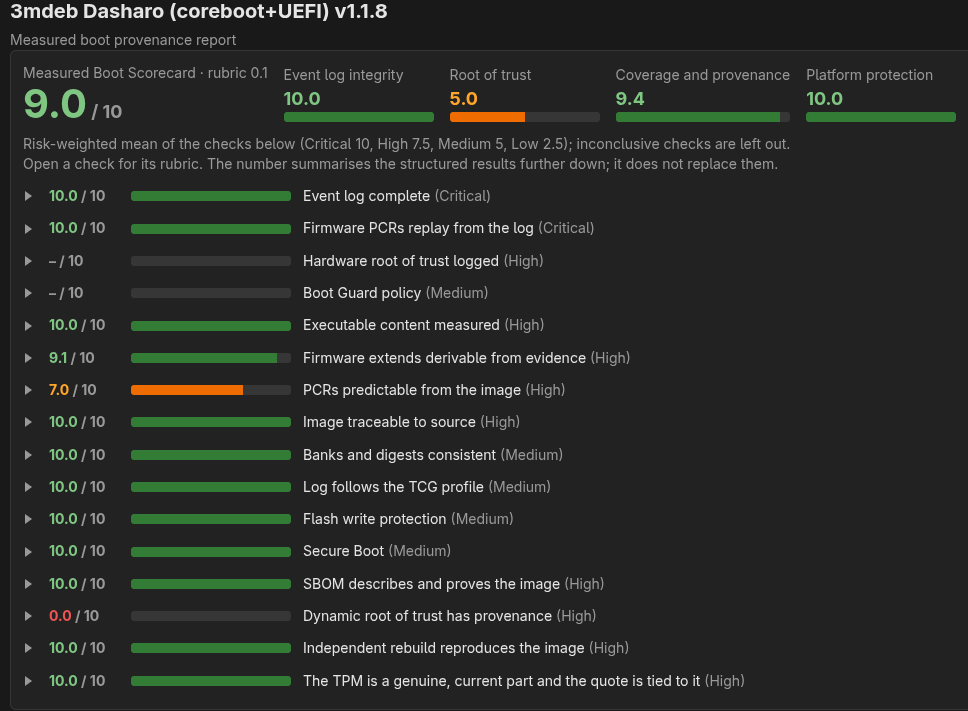
The report above was generated with Dasharo v1.1.8 on an MSI PRO Z690-A DDR4. The event log is complete, the firmware PCRs replay correctly from the log, all executable content is measured, the image is traceable to source and an independent rebuild reproduces it bit for bit.
Summary
This release fixes the critical issues of v1.1.7 and v0.9.5 and brings the Platform Setup Menu options to a much more usable state. Reliable DDR4 XMP training, working Turbo Boost and load line tuning make Dasharo on MSI PRO Z690-A and Z790-P a much more attractive choice for enthusiasts. At the same time, the struggle with undocumented FSP option dependencies shows how much validation effort is behind every exposed option.
Remember: the overclocking options remain experimental and unsupported, and any hardware damage resulting from their use is the user’s responsibility. We encourage everyone to update, test, and share your experiences through GitHub issues or Dasharo HCL reports via DTS.
If you wish to hear more about Intel FSP integration with Dasharo supported platforms, be sure to book your time on 8th December for the Dasharo FSP integration status meeting.
If you’re looking for hardware with full Dasharo support, check out our Dasharo Supported Hardware.
Unlock the full potential of your hardware and secure your firmware with the
experts at 3mdeb! If you’re looking to boost your product’s performance and
protect it from potential security threats, our team is here to help.
Schedule a call with us
or drop us an email at contact<at>3mdeb<dot>com to start unlocking the
hidden benefits of your hardware. And if you want to stay up-to-date on all
things firmware security and optimization, be sure to sign up for our
newsletter: