.png)

Introduction
Note: For affected users seeking immediate guidance, please refer to Dasharo Security Bulletin DSB-001. This blog post provides additional technical context and details.
This report serves as a disclosure and post-mortem analysis of a critical incident identified on 5th December 2025 affecting Dasharo firmware for NovaCustom V540TU and V560TU platforms. A release engineering error resulted in firmware binaries signed with an ephemeral testing key being published for the Dasharo TrustRoot fusing operation instead of binaries signed with the production key.
Users who performed the fusing operation between 24th October and 5th December 2025 may have irreversibly written the wrong cryptographic key hash into their SoC’s Field Programmable Fuses (FPF). Because these fuses are One-Time Programmable and the ephemeral key’s private component is no longer accessible, affected devices cannot receive future firmware updates.
This document provides a technical breakdown of what happened, why software recovery is impossible, and the corrective measures implemented to prevent recurrence.
The role of Dasharo Tools Suite
The Dasharo Tools Suite (DTS) is the vehicle for delivering and maintaining Dasharo firmware updates. Built as a minimal Linux distribution based on the Yocto Project, DTS boots directly on the target hardware to perform low-level maintenance tasks that are often impossible from within a standard operating system. It interfaces with the SPI flash controller, the Embedded Controller (EC), and the Intel Management Engine.
One of the recently added DTS features is fusing the device vendor keys.
The fusing operation involves writing to One-Time Programmable (OTP) registers within the chipset. The design of DTS aims to abstract the immense complexity of this operation, wrapping the complex and potentially dangerous tasks into a user-friendly workflow. In this incident, DTS executed the fusing operation correctly according to its design, but the firmware binary it was instructed to use had been incorrectly selected by the release engineer.
The concept of owner-controlled security
The incident highlights the inherent risks of owner-controlled security. In a traditional firmware deployment model, the vendor manages the keys, the fusing, and the updates. In the Dasharo model, the user has the ability to choose. When a user chooses to fuse their platform, they are essentially performing a final assembly factory procedure on their own desk. They are instructing the silicon to reject any code that does not match the cryptographic signature of the vendor (in this case: NovaCustom). This places a large burden of reliability on the supply chain delivering the payload for that operation. The failure discussed here was a breach of that reliability.
Technical background: Intel Boot Guard
Intel Boot Guard is a hardware-assisted root of trust that prevents firmware compromise before the OS loads. The architecture relies on Field Programmable Fuses (FPF) in the Platform Controller Hub - One-Time Programmable e-fuses that store a SHA-384 hash of the OEM’s RSA public key (the OEM Public Key Hash). Once programmed, these fuses cannot be reverted, providing immutable hardware security. You can refer to Intel documentation for more details.
Key points in the verification chain:
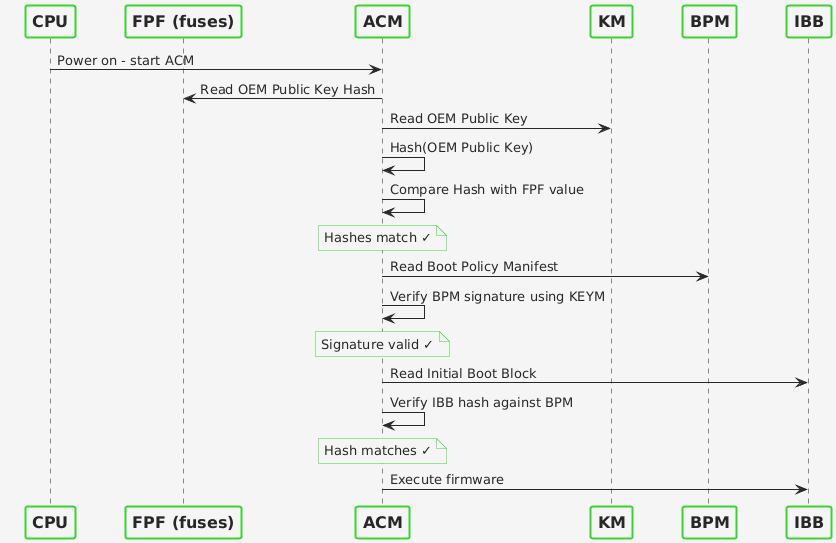
- The CPU’s Authenticated Code Module (ACM) reads the Key Manifest (KEYM) from firmware, hashes the public key it contains, and compares it to the FPF value
- If the hashes match, the ACM trusts the KEYM and proceeds to verify the Boot Policy Manifest (BPM), which is signed by that key
- The BPM defines the boot policy and contains hashes of the Initial Boot Block (IBB)
- Only firmware matching this chain of trust will execute
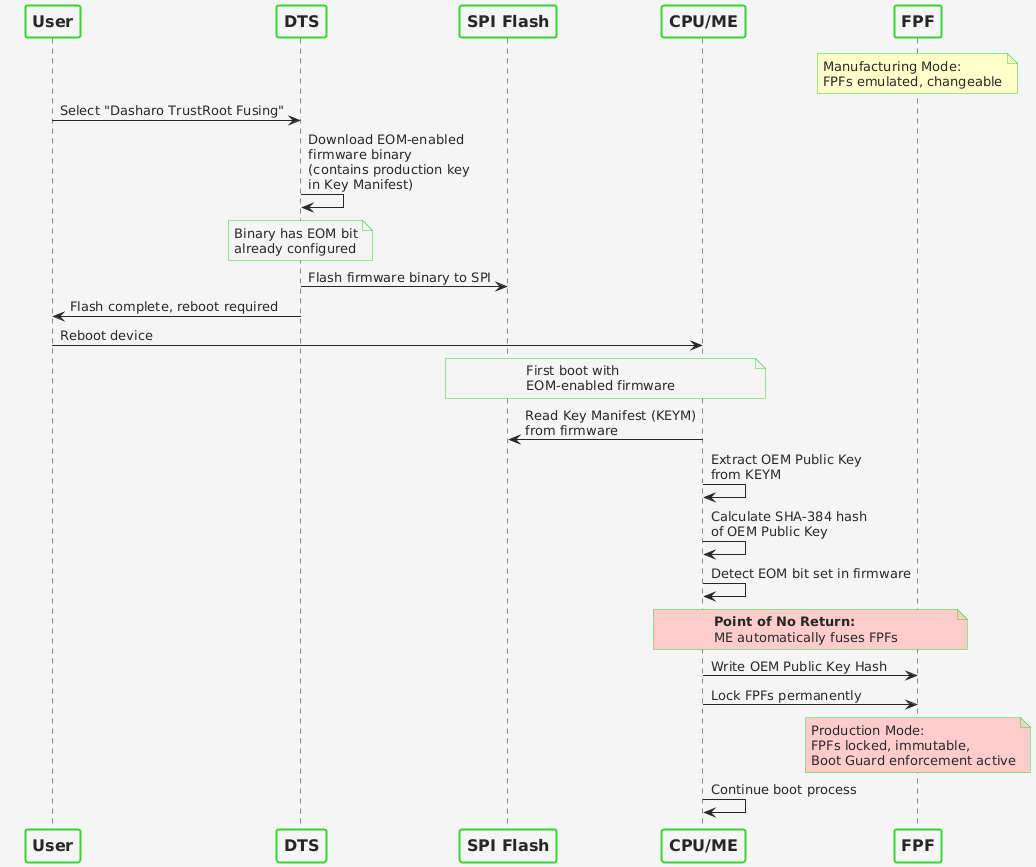
During manufacturing, devices operate in “Manufacturing Mode” where FPFs are emulated and changeable. Dasharo TrustRoot fusing writes the OEM Public Key Hash to the FPFs and sets the End of Manufacturing (EOM) bit, which permanently locks the fuses and enforces the Boot Guard policy on all subsequent boots.
What went wrong
The NovaCustom firmware release process involves coordination between 3mdeb (development) and NovaCustom (production key custody). The production key is held by NovaCustom as a security measure, ensuring the vendor retains control over the hardware trust anchor. During development, binaries are signed with ephemeral keys to verify Boot Guard functionality before final production signing.
The failure occurred during artifact publication. A release engineer uploading the binary for Dasharo TrustRoot fusing inadvertently selected a file signed with an ephemeral key due to filename similarity. Despite standard release protocols, a manual oversight occurred during the final publication step, leading to the incorrect binary being distributed.
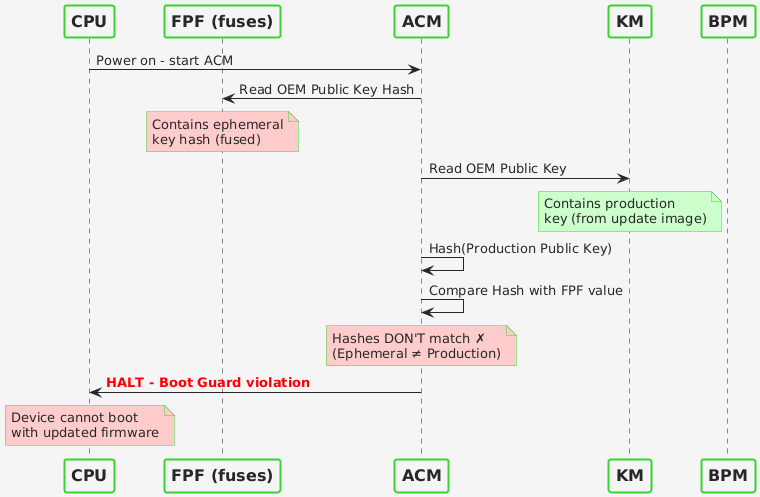
Once users performed the fusing operation, the FPFs were irreversibly programmed with the ephemeral key’s hash. Because the ephemeral key was a temporary artifact (since deleted), future firmware updates cannot be signed with it.
Updating with a binary signed by a key that mismatches the fused key will result in a brick. As a result, the device is permanently rendered unmaintainable and non-compliant with security standards, making it effectively unfit for professional use. To restore the device to a fully functional and secure state, the physical replacement of the mainboard is required.
Why software recovery is impossible
The FPFs are One-Time Programmable. Once the EOM bit is set, the Management Engine hardware permanently blocks any modification to the fuses. We cannot erase the ephemeral key hash or add the production key hash to the silicon. External programmers like the CH341a can write to the SPI flash chip but cannot modify fuses inside the CPU/PCH. Even if a production-signed binary were flashed externally, the ACM would reject it due to the hash mismatch with the fused value.
The motherboard must be physically replaced to restore update capability.
Next steps and follow-up
We are reviewing this incident internally and capturing the lessons learned. Based on the outcome of that work, we plan to publish a follow-up post describing the additional safeguards and refinements we are introducing around our release activities.
We will share more details once the review is complete and the resulting actions are finalized. We may also present the outcomes in an online presentation to provide the community with a clear view of what changed and why.
Am I affected?
To check if you are affected, we’ve developed a script, which is now integrated into Dasharo Tools Suite. If you performed the fusing operation, follow these steps and check if your device is impacted:
- Boot into Dasharo Tools Suite
- Press the S key to enter shell mode
- Type
btg_key_validatorand press Enter
You will be presented with one of the following screens:
Correct keys were used for signing:
|
|
Incorrect keys were used for signing:
|
|
If the script outputs the text above, and you performed the fusing operation, your device is affected and eligible for hardware replacement.
More information about the btg_key_validator script is available here
Before sending in your laptop for service
Replacement of the motherboard means that the TPM module will also be replaced, therefore all secrets stored in it will be lost. If you are using a TPM for storing secrets, for example if using LUKS or BitLocker, please make a backup of important data before sending in your laptop for repair.
Windows 11 may use BitLocker by default. If you are not sure if your Windows 11 installation is using BitLocker, here’s an instruction on how to check it: link.
Conclusion
This inicident is a reminder of the precision required in hardware security operations. A single human error swapping a production binary for a test binary cascaded into a hardware-enforced maintenance lockout for our users.
We explicitly acknowledge:
- The fusing was correct: the command to set the EOM bit was the intended behavior of the tool.
- The payload was flawed: the published binary was signed with an internal ephemeral key, not the NovaCustom production key.
- The responsibility is ours: selecting the wrong binary file during the manual upload process was a human error that should not have occurred.
To the affected users, we offer our unreserved apologies and our dedicated support in replacing your hardware.
We appreciate your understanding. The path to digital sovereignty is steep, but we climb it together.